
•Download & Installation
First you must download the mcaddon file. You can find one in the release section on GitHub. After which, you open it with Minecraft and it will be imported into your game. Once there, choose a world you want to apply this addon to, and add the behaviour pack (the resource pack should apply automatically). The "Beta APIs" experimental feature must also be enabled.
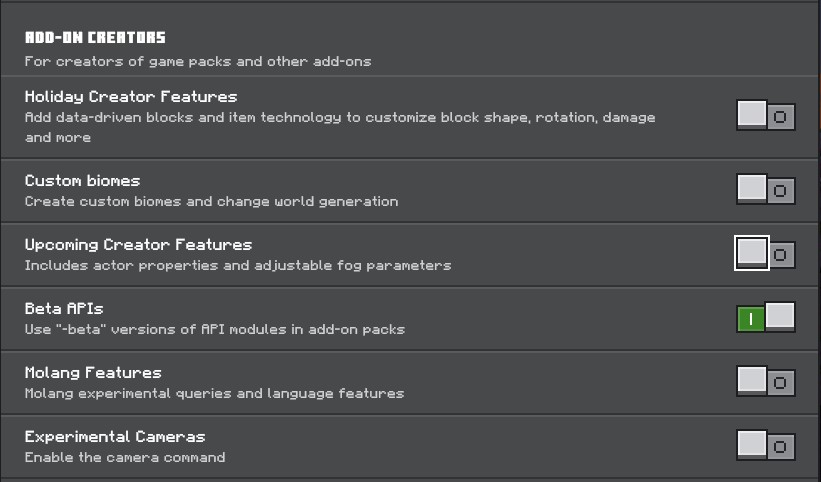
And that's it! Your world is ready for WorldEdit.
•In the World
Once you are in your world, use the command /tag @s add worldedit to grant you the permissions and allow you to use the add-on.
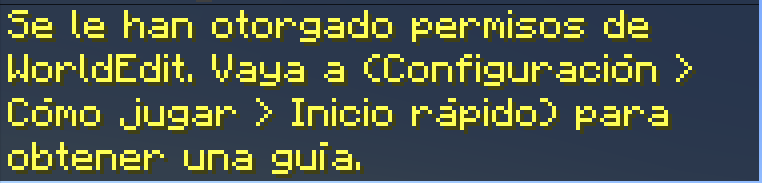
Once the authorization message appears, you can use the ;kit command to obtain the WorldEdit items.
•Descarga e Instalación
Primero debes descargar el archivo mcaddon. Puedes encontrar uno en la Sección de lanzamientos en GitHub. Después, ábrelo con Minecraft y se importará a tu juego. Una vez allí, elige el mundo al que quieras aplicar este complemento y añade el paquete de comportamiento (el paquete de recursos debería aplicarse automáticamente). También debes habilitar la función experimental «Beta APIs».
¡Eso es todo! Tu mundo está listo para WorldEdit.
•En el Mundo
Una vez que estés en tu mundo, usa el comando /tag @s add worldedit para otorgarte los permisos y permitirte usar el complemento.
Una vez que aparezca el mensaje de autorización, puedes usar el comando ;kit para obtener los elementos de WorldEdit.